



Full View
Similar items
LANGTU M8 Wireless Gaming Mouse – Triple Mode Bluetooth 5.0/2.4G/USB, Ergonomic Design For Office
RON29.92
RON51.54 -41% OFF

Wireless Gaming Mouse X8 With RGB Lighting, 2400 DPI, 6 Buttons, Ergonomic Design For PC/Laptop - Compatible With Mac & Windows (Black/White/Gray)
RON22.34
RON34.95 -36% OFF
Incott G23 V2 Micro-action Hot-swappable Mouse E-sports Game Office Lightweight Wireless Bluetooth 8K Medium Big Hand
RON110.35
RON151.74 -27% OFF
Wireless Mouse Bluetooth Mouse Wireless Computer Mouse RGB Rechargeable Ergonomic LED Backlit Mause Silent Mice For Laptop PC
RON24.30
RON28.61 -15% OFF
Farfi G905 Wired Mouse Hollow Honeycomb Adjustable DPI Programmable 7200DPI Game Mice for Desktop
RON37.73
RON52.87 -28% OFF
Wireless Trackball Mouse 2400DPI Rechargeable Ergonomic Wireless Mouse For PC Laptop Pad Computer
RON105.52
RON152.08 -30% OFF
Akko Smart V9 Master 3955 Professional Priority Wireless 8K Gaming Mouse Triple Mode Esports Lightweight
RON102.04
RON147.25 -30% OFF
Ultra-Lightweight Tri-Mode Silent Gaming Mouse With 6400DPI, 2.4G Wireless/Bluetooth/USB, Ergonomic Design For PC/Laptop
RON23.35
RON39.99 -41% OFF
ATTACK SHARK X11SE Wireless Bluetooth Mouse Game E-sports Long Battery Life Three-mode Lightweight
RON58.72
RON77.11 -23% OFF
MCHOSE K7 Ultra Lightweight Mouse 8k Magnetic Wireless Charger PAW3950 Bluetooth
RON160.36
RON205.11 -21% OFF
Ergonomic Rechargeable 2 Model for Gaming Computer Wirelesss Mouse Tablet Mobile System Bluetooth Mice Pc Laptop Accessories
RON240.69RON315.55
color : gray
Quantity :

Report
Include copyright infringementFree Standard Shipping. See details
Estimated between Mon, Aug 3 and Sun, Aug 9
You can return the product within 30 days of receipt. See details
Shop with confidence

Money Back Guarantee
Get the item you ordered or your money back. Learn more
About this item
Sourced from WEIMAI 3C
Seller assumes all responsibility for this listing.Item number: 27624156
Item specifics
Item description from the seller
TWO MODELS
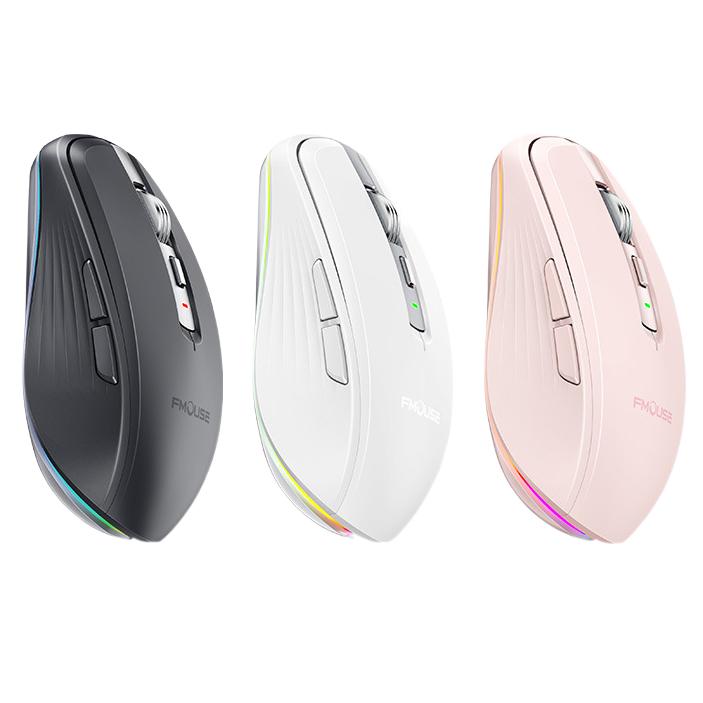
WIRELESS RGB RUNNING HORSE LAMP MOUSE
2.4G WIRELESS+BLUETOOTH
Rainbow Lights: Fmouse M303 wireless mouse is a colorful and small LED mouse. You can easily switch up to 10 different light backlit or turn off the light by pressing the bottom LED button.It makes your working & life more interesting and cool.
Type C Charging: This changing color wireless mouse use a rechargeable battery, it charges through a type C cable. The mouse will auto be in sleeping mode to save battery, and there is a low power indicator, it flashes red light when the battery is low, which help you to charge on time.
4 DPI Level & Comfortable Design: USB computer mouse wireless has 4 DPI levels (800/1600/2400/3600), free to control your own speed of the mouse. Thanks to the design, this mouse fits well for a small or medium hand, prevent any possible wrist pain.
Plug & Play: The wireless mouse comes with a small USB nano receiver ( stored at the bottom of the mouse), you can just plug it into your computer and you are ready to go.
Universal Compatibility: Works with any computer PC Laptop tablet with USB or type c port, running on Windows XP, Windows Vista, Windows 7/8/10, Mac OS etc.
Model: M303 Type: 2.4G+BT5.1 dual-mode optical mouse DPI: 2400 Size: L100*W65*H34mm Feature: 7-button wireless charging mouse RGB marquee Bare metal weight: 72±5g Battery capacity: 700mAh Battery type: polymer lithium battery Fretting life: 5 million times
1* Wireless Mouse 1* Type C Charging Cable 1*USB Receiver (under earth the mouse) 1* User Manual
Note:
1. It's out of power if the mouse cursor moves slowly or stop moving, the indicator which below the DPI button will flash red light, please use the charging cable to recharge it. It's recommended to charge the mouse on computer interface.
2.Please charge the mouse for 2 hours before the first time to use it. The red light beside the scroll wheel will be on while charging, and then goes off when the mouse is fully charged.
3. The mouse will be in sleeping mode after 8 minutes inactivity, you can click any button to wake it up.
4. If connection fails, turn off the mouse, remove and reinsert the dongle, then turn on the mouse try again.